Applications of Tree Topology
A tree topology brings together the features of star and bus topologies. It allows its existing network to expand easily. Now, together let’s explore everything you need to know about tree topology, including its diagram, examples, uses, applications, and types.
At the end of this post you will definitely understand what a tree topology is without any problems.
What is Tree Topology?
A tree topology is a kind of structure where several connected parts are getting to arrange like the branches of a tree. In a tree topology network, all computers and devices connect in a hierarchical structure. A tree topology allows star topologies where a single node is getting to connect to a central node.
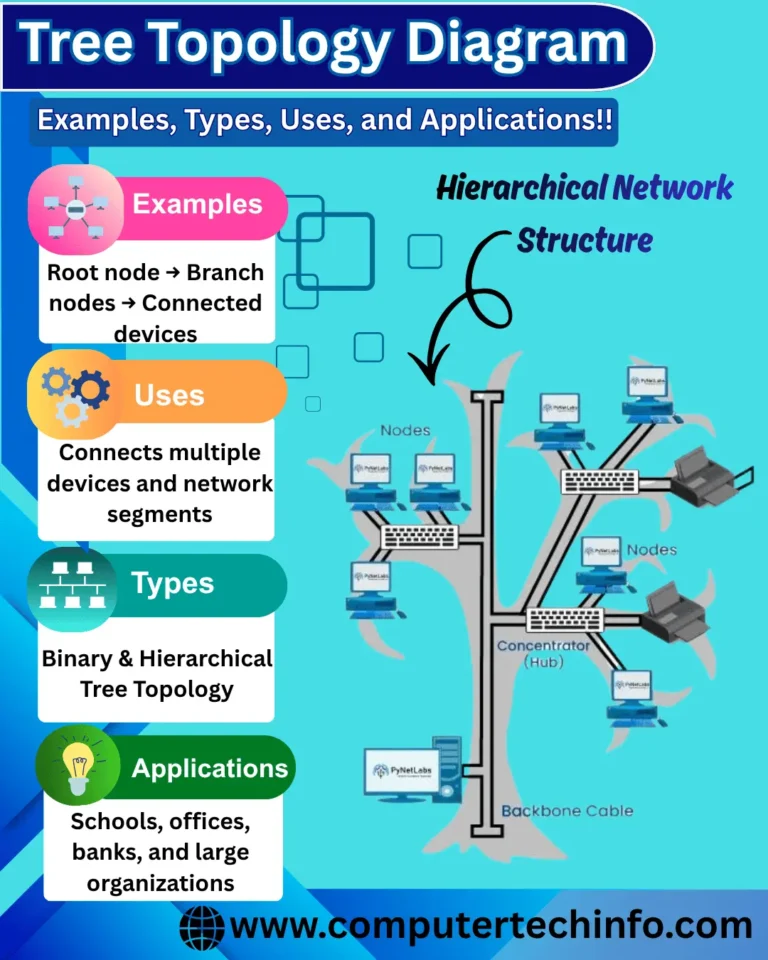
Tree Topology Diagram
A tree topology is also known as a star bus topology because it includes elements of both a star and a bus topology. A tree topology uses a program to manage the network. It also provides a point for control and fixing errors.
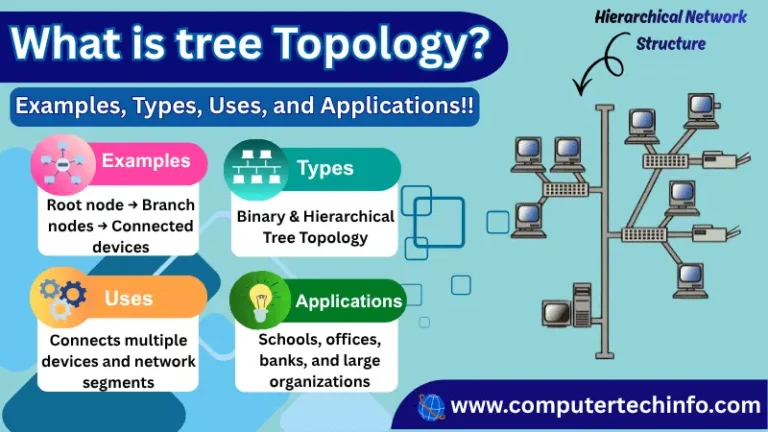
It is a system that is at the top of the hierarchy and it is usually a mainframe computer. A tree topology supports point-to-point cabling between segments and is compatible with various hardware and software vendors.
Tree Topology in Computer Network
In the context of a computer network the tree network topology is sometimes called the star topology. This is because; it combines features of both a bus and a star topology to create a tree- structure in a tree topology; each branch follows a star network topology. Then it connects to form a bus backbone cable.
So the main bus is connected to a multiple buses and network switches; and eventually it connects to one or multiple network devices and nodes.
It is a scalable network topology that lets you add many network devices to this network by scaling the star network at every branch of the tree. However you might need to add or remove devices at a time.
Types of Tree Topology
A tree topology has three categories; here are each one:
Cluster Tree Topology:
In a cluster tree network topology, the parent-child relationship between nodes is a most essential concept. Parent devices are typically network switches or hubs.
Bus Tree Topology:
This network topology has a backbone cable that’s responsible for communication across the tree network and you connect the PCs to centralized devices like switches and hubs.
In addition to connecting each computer the bus backbone connects to the central devices. Users can connect all devices directly to the backbone wire if they want.
Spanning Tree Topology:
In the spanning tree topology, all nodes make connection in a graph form. It also has another variant called MST (Minimal Spanning Tree). It provides a way to connect all graph edges. This topology has backbone cables for connecting many clusters, which are present throughout the computer network.
Important!! When a signal reaches the end of the backbone cable it removed by the terminator that’s at the end of the backbone cable. If it does not reach the end and keeps looping on the backbone then STP (Spanning Tree Protocol) is used, to prevent traffic congestion on the network.
Examples of Tree Topology in Real Life
There are examples that are using in daily life such as:
In university campuses and hospitals several floors can be connecting with each other using a combination of a central bus backbone and a star topology.
B-trees work similarly to a tree network topology that is using in programming languages such as Redis, PostgreSQL and MySQL and file systems that use ext4, NTFS.
This topology also commonly uses for organizing many databases and workstations. Any two network topologies can be connecting into a tree topology as a connection.
Applications of Tree Topology
Although tree topology is not commonly used in all applications, its effectiveness depends partly on the network requirements and how users organize and manage the network. Users can take advantage of its hierarchical structure to connect multiple devices efficiently. Zigbee is an example of a wireless communication technology that can support a tree topology, although it also supports other network topologies, such as star and mesh. For instance, in a multi-level building, Zigbee can be used to create clusters of devices on each floor or in different sections of the building, with these clusters connected in a hierarchical tree structure. Furthermore, a computer or another network device can be added at an intermediate point in the hierarchy to connect or manage devices in the branches below it, provided the network’s design and equipment support this arrangement.
A tree topology is usually using to recognize the system in a network in order to distribute data across the network and to let the network operator connect servers.
A tree topology network also uses in database systems such as PostgreSQL, MySQL, Redis and file systems such as HFS+, Ext4 and NTFS.
Tree Topology Considerations; You Should Be Known
A tree topology allows the extension of bus and star topologies, which means it is capable of linking these networks into a larger system-wide design that maintains the hierarchical structure that some businesses need. It is a layout for other options that do not have the same ability to scale because it provides an alternative that uses available resources.
It is an easy way to expand an existing network because you only need an additional cable and a hub. Also many star networks can be connecting to the backbone cable without any issue.
In a tree topology the error detection process is the easiest. Each node in the topology is connected through a hub. So the hub can identify the node that is having an error while all information is getting to transmit through the nodes passes through the network hub device. You can also easily replace the cable or fix other issues in the nodes.
A tree topology is divided into parts; if one workstation fails the other operations will not be affected. Even if the central hub fails the entire network will still work properly. However if the backbone wire gets damaging the operations will be affecting because the whole network is completely dependent on the backbone cable.
If you want to add devices to your tree topology network it can be considering as the best choice. A tree topology has an approach that allows support from several manufacturers. It ensures that the admin is able to access the devices for maintenance and other tasks.
Most tree topologies are divided into star networks; then these workstations can connect to a centralized hub that provides the link to the backbone wire. Because of this the whole system becomes easy to maintain and manage because admins have layers of protection to use. Every star topology is able to function on its own from the rest of the network as needed.
FAQs (Frequently Asked Questions)
What is Tree Topology With Diagram?
Tree topology includes the features of a star and a linear bus topology; it makes it possible to expand a network. Its diagram is already shown above in this post; you can check it.
What Is Another Name Of Tree Topology?
A tree topology is also known as a hierarchical topology, in which the root node connects to other nodes in a hierarchical structure. Also it is also known as ‘Star Bus Topology’ because it combines star topologies into a single bus.
What is Tree Topology Example in Life?
In university campuses and hospitals several floors can be connected with each other using a combination of a central bus backbone and a star topology.
What Are The Different Types Of Tree Topology in Computer Networking?
A tree topology has three variations like Cluster Tree Topology, Bus Tree Topology and Spanning Tree Topology. Each one is explored in detail
Where Tree Topology is Used in Life?
A tree topology is usually used to connect devices like computers, printers and FAX machines in your home or small office.
Final Words
Now, I hope you have gained a complete understanding of tree topology, including its diagram, examples, uses, applications, and different types. You should also understand how a new network can be added in the middle of a tree topology to connect multiple branches or sections of the network. This helps expand the network and connect additional devices while maintaining its hierarchical structure.
If this article is valuable for you, then please share it along with your friends, family members, pet lovers or relatives over social media platforms like as Facebook, Instagram, LinkedIn,X, and more.
About the author
Launching Computer Tech Info for providing premium information about different categories in form of Blogging, including Computer, Technology, & How To.
Comments
Join the discussionNo comments yet. Be the first to comment.